This is a followup to my previous two articles, first My Homeserver is dying in slow motion and then the old box got replaced in My homeserver is new again…. One of the decisions I made is going Proxmox as Base instead of a bare metal linux with services. Way easier to maintain. But Proxmox by default isn’t built for powersaving at all.
Powersaving Homeserver
For many of you some kWh a day may not matter, but in Europe where I’m from the electricity prices are terrible expensive for homeusers. In my Region the average home user price per kWh is about 0.38 EUR. So cumulated over the whole year this can make a difference, this is also why the general usage of Devices and standby here is way different compared to some Friends in US or some Asian countries. If I go to Dinner or just 20min to the local market nearby I normally shutdown my desktop. Even if it would be way more convenient to just keep it running. But on my desktop even in idle this is easy alot of Watts a year I could save.
For the new Homeserver the saving potential is not that critical, because the new one already consume less than the old one, but after some weeks of running proxmox on the new Hardware I realized it is still around 42W even in absolute idle times like 3 AM.
Time to check why…
For the Background, I run a setup with a ZFS pool on 3 Spinning HDDs with one SATA SSD for cache and M2 NVMe drive for the OS and another one for some experiments non critical fast VMs. So usually the NVMe and Sata SSD you do not need to care, but having 3x WD Red’s in my Pool can drive the power up.
Reducing Proxmox Powerconsumption
Well Proxmox is Linux at the end, a Debian 13 Trixie to be more precise. So why not looking where I normally would look. Spindown time of the HDDs first, CPU governor, potential other power toggles.
The Status Quo quickly showed that Proxmox wants performance not powersaving. All settings by default priorizing performance over efficiency. This is of course not optimal for my Idea of a powersaving homeserver. So I checked:
- governor: performance
- epp: power
- driver: acpi-cpufreq
- eee: off
- wifi+bt: on
- nmi_watchdog: on
Ok first I tried to set governor to powersave, changing the driver to force AMD pstate, hdparm all spinning disks to spindown after 10 Minutes of no activity. This quickly showed promising results.
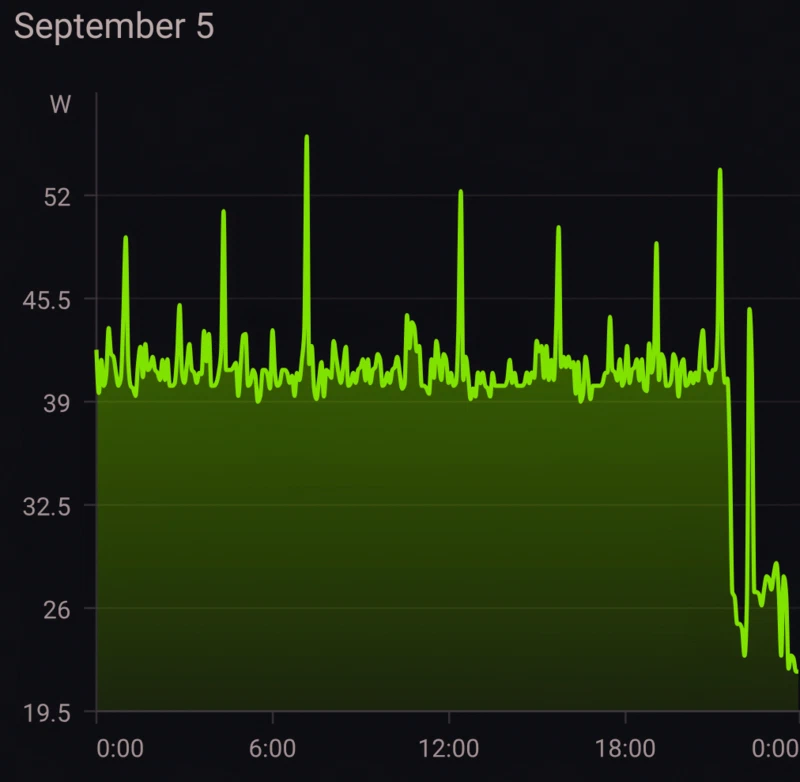
As you can clearly see after the setting changes the Powerconsumption dropped from ~42W to ~22W which is in percentage a huge difference.
What did I actually change? You can try the same adjusted to your hardware:
# set hdd spindown time
hdparm -B 127 /dev/sda
hdparm -S 120 /dev/sda
hdparm -B 127 /dev/sdb
hdparm -S 120 /dev/sdb
hdparm -B 127 /dev/sdc
hdparm -S 120 /dev/sdc
# Enable EEE on my LAN
# careful with this you may lose connection to your server
ethtool --set-eee enp12s0 eee on
ethtool -C enp12s0 rx-usecs 125
# setting govenour
apt install linux-cpupower tuned
cpupower frequency-set -g powersave
# no periodic wakeup by watchdog
sysfs_set /proc/sys/kernel/nmi_watchdog 0
sysfs_set /proc/sys/vm/dirty_writeback_centisecs 1500
This is about 175.20 kWh saved / year which sounds not much but this is more than 60€ a Year for just some settings changed. Of course the system is not idle 100% a Year, so the actual saving will be less.
Automating it
Of course I do not want to re-apply those things after each reboot. So I decided to create a small bash script which handle all powersettings for my specific hardware to go to powersave or balanced. It will be started after each reboot automatically and re-run every day at 11 PM via a simple cron. The Script is mostly built to be dynamic and unspecific so it should run well on any proxmox installation, but tested only with my Homeserver Hardware at home. As for every script from the big internet, check it before you run it.
#!/bin/bash
# pve-powersave.sh
#
# Re-applies my idle power settings on the Proxmox box
# (Ryzen 7 5825U, PVE 9 / Debian 13). Everything here is a runtime
# sysfs/ethtool/hdparm setting, nothing survives a reboot, so run it
# at boot (systemd oneshot or cron @reboot) and re-run whenever you like.
#
#   pve-powersave.sh            apply everything
#   pve-powersave.sh --status   just show what is set right now
#

set -u
PATH="/usr/sbin:/usr/bin:/sbin:/bin"

# ---- knobs, change here -------------------------------------------------
EPP="balance_power"       # power | balance_power | balance_performance
ASPM="powersave"          # powersupersave broke a NIC for me once, stay here
SATA_LPM="med_power_with_dipm"
HDD_STANDBY=180           # hdparm -S: 120 = 10 min, 0 = never spin down
HDD_APM=127               # 1-127 allows spindown, 128+ does not
EEE=1                     # set to 0 if the NIC link ever flaps
RX_USECS=125              # NIC interrupt coalescing, fewer wakeups
USB_AUTOSUSPEND=0         # 1 only if no UPS / keyboard / KVM on USB
PCI_RUNTIME_PM=1          # NICs and disk controllers are always skipped
RFKILL_WIFI_BT=1          # server is on ethernet, wifi + bluetooth are dead weight

# ---- helpers -------------------------------------------------------------

# print + syslog, so cron runs end up in journalctl -t pve-powersave
log()  { echo "$*";               logger -t pve-powersave -- "$*"; }
warn() { echo "WARN: $*" >&2;     logger -t pve-powersave -- "WARN: $*"; }

# write a value into a sysfs/proc file, fails quietly if the file is
# missing or the kernel refuses the value (caller decides if that matters)
sysfs_set() {
    [[ -w $1 ]] || return 1
    echo "$2" > "$1" 2>/dev/null
}

# ---- cpu -----------------------------------------------------------------
# With amd-pstate-epp the governor must be "powersave", the real tuning
# is then done via EPP. Anything else (acpi-cpufreq, passive amd-pstate)
# gets schedutil, because "powersave" there would pin the min frequency.
set_cpu() {
    local drv gov cpu
    drv=$(cat /sys/devices/system/cpu/cpu0/cpufreq/scaling_driver 2>/dev/null)

    if [[ $drv == amd-pstate-epp ]]; then
        gov=powersave
    else
        gov=schedutil
        warn "cpu driver is '$drv', not amd-pstate-epp. Add amd_pstate=active to the kernel cmdline and check CPPC is on in the BIOS."
    fi

    for cpu in /sys/devices/system/cpu/cpu[0-9]*/cpufreq; do
        sysfs_set "$cpu/scaling_governor" "$gov" || true
        # EPP only exists (and is only writable) with amd-pstate-epp + powersave
        sysfs_set "$cpu/energy_performance_preference" "$EPP" || true
    done

    log "cpu: $drv, governor=$(cat /sys/devices/system/cpu/cpu0/cpufreq/scaling_governor), epp=$(cat /sys/devices/system/cpu/cpu0/cpufreq/energy_performance_preference 2>/dev/null || echo n/a)"
}

# ---- pcie / sata / misc kernel knobs --------------------------------------
set_platform() {
    # PCIe link power states. Fails if the BIOS or cmdline locked it.
    sysfs_set /sys/module/pcie_aspm/parameters/policy "$ASPM" \
        && log "aspm: $ASPM" \
        || warn "aspm: could not set policy (locked by firmware/cmdline?)"

    # SATA link power management, one entry per AHCI port
    local host
    for host in /sys/class/scsi_host/host*/link_power_management_policy; do
        sysfs_set "$host" "$SATA_LPM" || warn "sata lpm: failed on $host"
    done
    log "sata lpm: $SATA_LPM"

    # Fewer periodic wakeups. nmi watchdog is a debug feature, writeback
    # every 15s instead of 5s is fine for a homelab.
    sysfs_set /proc/sys/kernel/nmi_watchdog 0 || true
    sysfs_set /proc/sys/vm/dirty_writeback_centisecs 1500 || true

    # HDMI audio on the iGPU, power it down after 10s idle
    sysfs_set /sys/module/snd_hda_intel/parameters/power_save 10 || true
    sysfs_set /sys/module/snd_hda_intel/parameters/power_save_controller Y || true

    # Wifi/BT card in the mini pc is never used, radios off saves ~0.5W
    if (( RFKILL_WIFI_BT )) && command -v rfkill >/dev/null; then
        rfkill block wifi bluetooth && log "rfkill: wifi + bluetooth off"
    fi
}

# ---- disks ---------------------------------------------------------------
# Spindown for real spinning disks only. SSD/NVMe do their own thing.
# Careful: do not spin down disks that are in a busy ZFS pool.
set_disks() {
    command -v hdparm >/dev/null || { warn "hdparm missing, skipping disks"; return; }
    local name type rota
    while read -r name type rota; do
        [[ $type == disk && $rota == 1 ]] || continue
        case $name in zram*|zd*|nbd*|rbd*) continue ;; esac   # not real disks
        # two calls so an unsupported APM does not stop the standby timer
        hdparm -B "$HDD_APM" "/dev/$name" >/dev/null 2>&1 || warn "hdd $name: APM not supported"
        hdparm -S "$HDD_STANDBY" "/dev/$name" >/dev/null 2>&1 || warn "hdd $name: standby failed"
        log "hdd $name: apm=$HDD_APM standby=$HDD_STANDBY"
    done < <(lsblk -dn -o NAME,TYPE,ROTA)
}

# ---- nics ----------------------------------------------------------------
# Only real NICs have a "device" link in sysfs. vmbr/tap/veth/fwpr do not.
physical_nics() {
    local n
    for n in /sys/class/net/*; do
        [[ -e $n/device ]] && basename "$n"
    done
}

set_nics() {
    command -v ethtool >/dev/null || { warn "ethtool missing, skipping nics"; return; }
    local nic eee_now was_up
    for nic in $(physical_nics); do
        # "EEE status: enabled - active" / "disabled" / "not supported"
        eee_now=$(ethtool --show-eee "$nic" 2>/dev/null | grep -o 'EEE status: [a-z]*' | awk '{print $3}')
        was_up=$(cat "/sys/class/net/$nic/operstate")

        if [[ -z $eee_now || $eee_now == not ]]; then
            log "nic $nic: no eee"
        elif (( EEE )) && [[ $eee_now != enabled ]]; then
            ethtool --set-eee "$nic" eee on 2>/dev/null
            # link renegotiates, give it a moment and check it came back
            sleep 3
            if [[ $was_up == up && $(cat "/sys/class/net/$nic/operstate") != up ]]; then
                ethtool --set-eee "$nic" eee off 2>/dev/null
                warn "nic $nic: eee dropped the link, turned it off again. Set EEE=0."
            else
                log "nic $nic: eee on"
            fi
        elif (( ! EEE )) && [[ $eee_now == enabled ]]; then
            ethtool --set-eee "$nic" eee off 2>/dev/null
            log "nic $nic: eee off"
        else
            log "nic $nic: eee already $eee_now"
        fi

        ethtool -C "$nic" rx-usecs "$RX_USECS" >/dev/null 2>&1 \
            && log "nic $nic: rx-usecs=$RX_USECS" \
            || log "nic $nic: driver does not take rx-usecs, ignoring"
    done
}

# ---- pci / usb / igpu runtime pm ----------------------------------------
set_runtime_pm() {
    local dev
    if (( PCI_RUNTIME_PM )); then
        for dev in /sys/bus/pci/devices/*; do
            # class 0x01 = storage, 0x02 = network. Leave those alone,
            # runtime PM on them causes latency spikes or worse.
            case $(cat "$dev/class") in 0x01*|0x02*) continue ;; esac
            sysfs_set "$dev/power/control" auto || true
        done
        log "pci runtime pm: auto (storage + network skipped)"
    fi

    if (( USB_AUTOSUSPEND )); then
        for dev in /sys/bus/usb/devices/*; do
            sysfs_set "$dev/power/autosuspend_delay_ms" 2000 || true
            sysfs_set "$dev/power/control" auto || true
        done
        log "usb autosuspend: on"
    fi

    # iGPU: let amdgpu pick its own clocks
    for dev in /sys/class/drm/card*/device/power_dpm_force_performance_level; do
        sysfs_set "$dev" auto && log "amdgpu: dpm=auto"
    done
}

# ---- status --------------------------------------------------------------
status() {
    echo "== cpu"
    echo "driver:   $(cat /sys/devices/system/cpu/cpu0/cpufreq/scaling_driver)"
    echo "governor: $(cat /sys/devices/system/cpu/cpu0/cpufreq/scaling_governor)"
    echo "epp:      $(cat /sys/devices/system/cpu/cpu0/cpufreq/energy_performance_preference 2>/dev/null || echo n/a)"
    # if this only shows C1/C2, the BIOS is holding back deep C-states
    echo "c-states: $(cat /sys/devices/system/cpu/cpu0/cpuidle/state*/name | tr '\n' ' ')"
    echo "== aspm:  $(cat /sys/module/pcie_aspm/parameters/policy)"
    echo "== sata lpm"
    grep -H . /sys/class/scsi_host/host*/link_power_management_policy 2>/dev/null
    echo "== disks"
    lsblk -dn -o NAME,TYPE,ROTA,TRAN,SIZE,MODEL
    echo "== nics"
    local nic
    for nic in $(physical_nics); do
        echo "$nic ($(cat /sys/class/net/$nic/operstate)): $(ethtool --show-eee "$nic" 2>/dev/null | grep 'EEE status' || echo 'eee n/a')"
    done
    echo "== pci runtime pm: $(grep -lx auto /sys/bus/pci/devices/*/power/control | wc -l) auto, $(grep -lx on /sys/bus/pci/devices/*/power/control | wc -l) on"
    echo "== nmi_watchdog: $(cat /proc/sys/kernel/nmi_watchdog), dirty_writeback_centisecs: $(cat /proc/sys/vm/dirty_writeback_centisecs)"
    echo "== rfkill"
    rfkill list 2>/dev/null | grep -E '^[0-9]|Soft' | paste - - || echo "rfkill n/a"
}

# ---- main ----------------------------------------------------------------
case "${1:-}" in
    --status|-s) status; exit 0 ;;
    "") ;;
    *) echo "usage: $0 [--status]"; exit 1 ;;
esac

[[ $EUID -eq 0 ]] || { echo "run as root"; exit 1; }

log "start"
set_cpu
set_platform
set_disks
set_nics
set_runtime_pm
log "done"
GL HF
Comments
Nothing is loaded from external services until you click.
With a Fediverse or Mastodon account you can reply to this post. Replies from any compatible server are shown below once loaded.
Mastodon replies
Web mentions
Leave a comment
Reply to this post on Mastodon and your reply will show up here.