I mean isn’t it a totaly adult and viable decision to directly buy a tech thing after you read a bunch of blogs writing about it? Yeah, absolutely :) And as some of the Podcasts I listen also mentioned this one I was sold. As you can see on Bubbles how this is really in everyones “mouth” in the last days.

What the… ?
Well the XTEINK X4 isn’t just a regular boring ebook reader. It’s also not going to replace my 8" ebook reader, but it is tiny, it fits in my palm allowing me to really just have it with me everywhere.
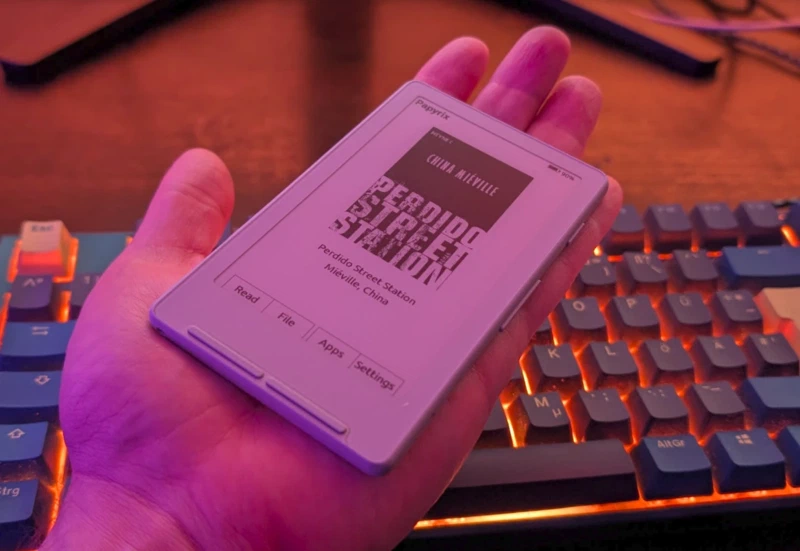
Light (74g) and tiny. But beside that another very cool fact is that it is based on a ESP32 and expose the JTAG via USB-C.
[19780.412325] usb 3-4: new full-speed USB device number 50 using xhci_hcd
[19780.597933] usb 3-4: New USB device found, idVendor=303a, idProduct=1001, bcdDevice= 1.01
[19780.597941] usb 3-4: New USB device strings: Mfr=1, Product=2, SerialNumber=3
[19780.597944] usb 3-4: Product: USB JTAG/serial debug unit
[19780.597946] usb 3-4: Manufacturer: Espressif
[19780.597947] usb 3-4: SerialNumber: F8:5B:1B:xx:xx:xx
[19780.602172] cdc_acm 3-4:1.0: ttyACM1: USB ACM device
[19780.754978] usb 3-4: USB disconnect, device number 50
ESP32 open Firmware
This means it is very easy to put custom firmwares on this little thing. And there are plenty of them to choose. The most common ones are crosspoint and papyrix.
Even the most famous may be crosspoint, my decision went with papyrix because I like how it offers wifi with webinterface to push ebooks onto the reader. Also it accept perfectly fine alot of formats like markdown and even a Calibre sync integration.
Once you connect the reader to your wifi (it can also open it’s own) you can simply access it via browser and upload stuff: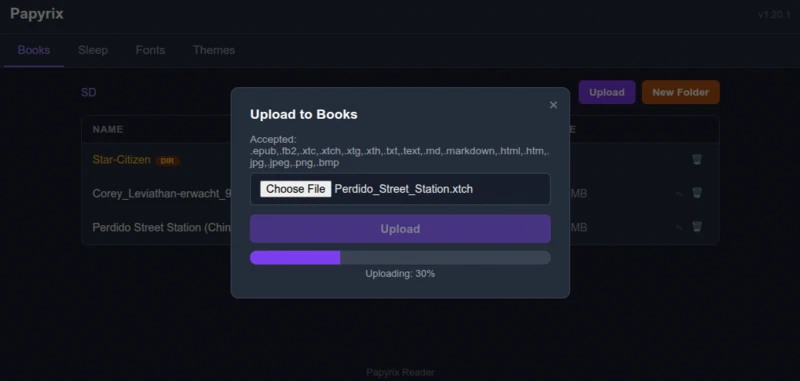
Flashing is a peace of cake, for crosspoint you can even do it from within your browserwindow. For Papyrix you download the flasher from the papyrix releases and the latest firmware and in less than 20s it is flashed to the device via usb-c.
➤ ./papyrix-flasher-linux-amd64 flash firmware.bin
Firmware: firmware.bin (4168640 bytes)
Detecting device...
Found ESP32 on /dev/ttyACM1
Port: /dev/ttyACM1 @ 921600 baud
Connecting to bootloader...
Uploading stub flasher...
Running stub flasher...
Stub running!
Connected!
Flashing bootloader at 0x0 (12464 bytes)...
  [==============================] 100% (9/9 KB) 416 KB/s
Flashing partitions at 0x8000 (3072 bytes)...
  [==============================] 100% (0/0 KB) 224 KB/s
Flashing otadata at 0xE000 (8192 bytes)...
  [==============================] 100% (0/0 KB) 91 KB/s
Flashing firmware at 0x10000 (4168640 bytes)...
  [==============================] 100% (1972/1972 KB) 95 KB/s

Flash complete!
Rebooting device...
Done!
XTCH Format
Discovered in another blog post about the X4 by sigkill.sh I found a link to a converter which offer this “strange” XTCH Format. It converts epub and other formats to a 1-bit or 2-bit bitmap based image format ebook. Why do I want this you may ask? Isnt text superior? Well yes and no. The Advantage is you can select fonts you like, display chapter and progress markers, fully mix text and graphics all 100% optimized for exactly this reader. I don’t think this is great for everything but I will give it a try for longer books like this example:

The converter I used you can find at x4converter.rho.sh
Another worth mentioning use for xtch comes handy if you want to read Mangas on this tiny device have a look at cbz2xtc Manga to xtch converters.
Conclusion
Finally a ebook reader I don’t forget at home because to bulky. This thing really give me no excuse not to take it. And reading a book even if it is just in 15min waiting time, is always preferable compared to another doomscrolling session on the phone. And good thing I did not mention, this thing doesn’t rip a hole in you Wallet, I sepnt about 70€ for it.
Interesting Idea is that they ship a ring magnet with it, so if you have a phone with magnetic backside or case you can just attach it to your phones back :)
Comments
Nothing is loaded from external services until you click.
With a Fediverse or Mastodon account you can reply to this post. Replies from any compatible server are shown below once loaded.
Mastodon replies
Web mentions
Leave a comment
Reply to this post on Mastodon and your reply will show up here.