Minor Blog Extensions
First I added asciinema support to better show some console stuff. ASCIInema allows to record a terminal session in text and replay it as text. So no wasteful GIF or blurry MP4 for just text. You can see the first use of it in this blog in my FZF SSH Parser Article. Then inspired by Naty I also implemented humans.txt [?] and human.json [?] standards to this blog. Im not so big in all the Indieweb standards. But specially in times of AI slob everywhere, it cant hurt to have more humans on the web.
Finally I tried to update my blog papermod Theme to the newest release, found the last official realeas is old, but there went some changes into the git repo. Unfortunately quickly found out a simple update is breaking a lot of stuff - postponed.
Laptop Change
A bit sad and happy at the same time. As a Tuxedo Computers user since many years I retired my Infinity Book gen9, admittedly a bit premature, as it was only two years old. However, as I mentioned earlier, I had been experiencing some issues with it. After replacing the battery it seemed to improve, just to show problems again weeks later. Battery draining sometimes even it is shutdown, freezes mid usage, fan kicking in 100% even no cpu load. Unfortunately all those things are just happened randomly and not reproducible, very hard for a support case with customer support.
Since I work in events and handle IT needs, reliability is an absolute must. Therefore, I decided to give Framework a try. I kept the NVMe and RAM of my Tuxedo and just ordered a Framework 13. Experience so far is positive. I opted for the 13" Intel Ultra 5 125H. Not the fastest but my thoughts were more -hope for better battery life if not picking the most powerful CPU- and tbh. most times I don’t need that powerfull CPU anyway. I do not game on this machine and most CPU intense things I do is running cmake or rust compiler 😇 Let’s see after some weeks, may write an short article about it.
Some Linux Tools
Not “big” enough to write a full article but worth to mention; Discovered some tools which I found handy to use in my normal Network IT use. Just a short rundown.
dstp
A simple one purpose tool to run certain network tests against a given IP or Domain. In one glance you can see status of ping, DNS, TLS, https state. Example:
➤ dstp codeberg.org
Ping: 28.751296ms
DNS: resolving 217.197.84.140
SystemDNS: resolving 2a0a:4580:103f:c0de::1, 217.197.84.140
TLS: certificate is valid for 87 more days
HTTPS: got 200 OK
Written in go works on Linux and MacOS, available on github.com/ycd/dstp.
discovery-rs
Great TUI mDNS/AVAHI browser written in Rust. Need to check what IP that stupid printer had again? See what devices are advertising services quickly. In the example Screenshot a M5 ESP:
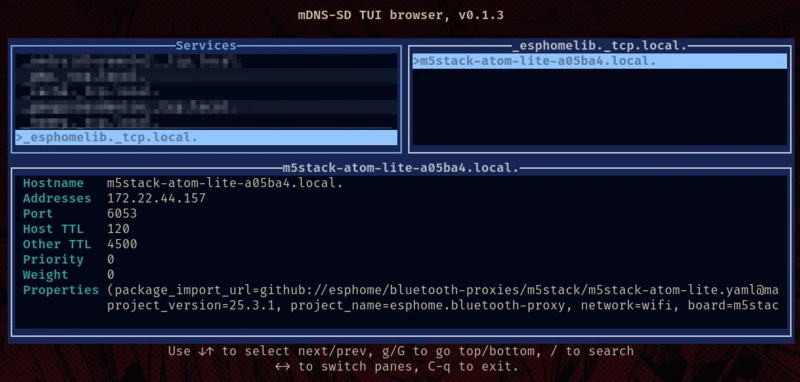
Available in common rust repo install with cargo install discovery-rs or check github.com/JustPretender/discovery-rs
Another worth mentioning mDNS Discover alternative with a nice TUI is whosthere I just recently discovered it - pun ? :) - I think the TUI is nicer compared to discovery-rs but take this recommendation carefully because I did not test it “in the field” so can’t say how reliable it is, for now at least.
Oryx
A TUI network sniffer based on eBPF, think tcpdump with a terminal GUI. Features like search and statistics make it a very nice tool to monitor network traffic. Easy to discover anomalies like arp storms. Also written in Rust. Find it at github.com/pythops/oryx
Damn Fu* Coldness
This Year really sucks in terms of Health. The Weather feels like a constant up and down and so does my body. Already April and not a single month were I did not had any coughing or sore throat. Can’t wait for the Spring finally arrive, enough of all this wet and cold days.
Comments
Nothing is loaded from external services until you click.
With a Fediverse or Mastodon account you can reply to this post. Replies from any compatible server are shown below once loaded.
Mastodon replies
Web mentions
Leave a comment
Reply to this post on Mastodon and your reply will show up here.