Not an lenghy Article, just posting my findings for whoever may need it.
The Hardware: i-tec USB-C 4K Metall Nano Docking Station
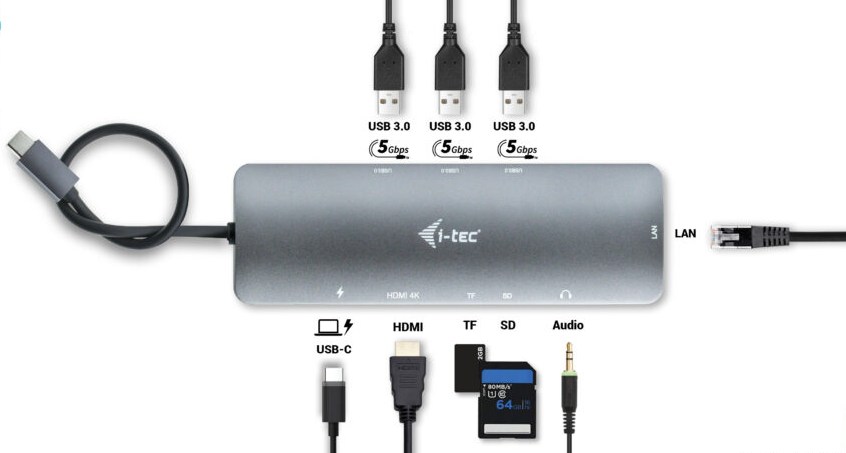
Named by the bulky name i-tec USB-C 4K Metall Nano Docking Station 1x HDMI 1x GLAN 3x USB 3.0 1x SD/MicroSD 1x Audio Power Delivery 100W I found mine on Amazon. Port-wise, it has what I need. Mostly I use this kind of light dock if I work remotely or at events to attach one screen, network, mouse and have it charging my laptop. So I can quickly grab it when I need to go somewhere.
dmesg
On my Fedora 43 quick dmesg log when plugging in the dock. I had plugged in 2 USB devices, an HDMI screen, network, and a 90W USB-C PD charger.
With some previous adapters, I had the issue that they were very picky about which port I used on my laptop, but this one didn’t care much.
[13572.247251] usb 3-1: new high-speed USB device number 18 using xhci_hcd
[13572.337179] usb 2-1: new SuperSpeed USB device number 9 using xhci_hcd
[13572.358474] usb 2-1: New USB device found, idVendor=05e3, idProduct=0626, bcdDevice= 6.63
[13572.358485] usb 2-1: New USB device strings: Mfr=1, Product=2, SerialNumber=0
[13572.358488] usb 2-1: Product: USB3.1 Hub
[13572.358490] usb 2-1: Manufacturer: GenesysLogic
[13572.361782] hub 2-1:1.0: USB hub found
[13572.362684] hub 2-1:1.0: 4 ports detected
[13572.375448] usb 3-1: New USB device found, idVendor=05e3, idProduct=0610, bcdDevice= 6.63
[13572.375453] usb 3-1: New USB device strings: Mfr=1, Product=2, SerialNumber=0
[13572.375454] usb 3-1: Product: USB2.1 Hub
[13572.375455] usb 3-1: Manufacturer: GenesysLogic
[13572.376617] hub 3-1:1.0: USB hub found
[13572.376853] hub 3-1:1.0: 4 ports detected
[13572.661967] usb 2-1: USB disconnect, device number 9
[13572.678131] usb 3-1.1: new high-speed USB device number 19 using xhci_hcd
[13572.777167] usb 3-1.1: New USB device found, idVendor=1a40, idProduct=0101, bcdDevice= 1.11
[13572.777175] usb 3-1.1: New USB device strings: Mfr=0, Product=1, SerialNumber=0
[13572.777177] usb 3-1.1: Product: USB 2.0 Hub
[13572.778587] hub 3-1.1:1.0: USB hub found
[13572.778612] hub 3-1.1:1.0: 4 ports detected
[13572.877336] usb 3-1.2: new full-speed USB device number 20 using xhci_hcd
[13572.979025] usb 3-1.2: New USB device found, idVendor=1e7d, idProduct=319c, bcdDevice= 1.00
[13572.979038] usb 3-1.2: New USB device strings: Mfr=1, Product=2, SerialNumber=0
[13572.979041] usb 3-1.2: Product: ROCCAT Isku
[13572.979043] usb 3-1.2: Manufacturer: ROCCAT
[13573.884908] usb 2-1: new SuperSpeed USB device number 10 using xhci_hcd
[13573.905813] usb 2-1: New USB device found, idVendor=05e3, idProduct=0626, bcdDevice= 6.63
[13573.905821] usb 2-1: New USB device strings: Mfr=1, Product=2, SerialNumber=0
[13573.905823] usb 2-1: Product: USB3.1 Hub
[13573.905825] usb 2-1: Manufacturer: GenesysLogic
[13573.908298] hub 2-1:1.0: USB hub found
[13573.909336] hub 2-1:1.0: 4 ports detected
[13574.192045] usb 2-1.1: new SuperSpeed USB device number 11 using xhci_hcd
[13574.211934] usb 2-1.1: New USB device found, idVendor=0b95, idProduct=1790, bcdDevice= 2.00
[13574.211939] usb 2-1.1: New USB device strings: Mfr=1, Product=2, SerialNumber=3
[13574.211941] usb 2-1.1: Product: AX88179B
[13574.211942] usb 2-1.1: Manufacturer: ASIX
[13574.211943] usb 2-1.1: SerialNumber: 0034298FXXXXXX
[13574.264676] cdc_ncm 2-1.1:2.0: MAC-Address: 98:fc:84:XX:XX:XX
[13574.264687] cdc_ncm 2-1.1:2.0: setting rx_max = 16384
[13574.265125] cdc_ncm 2-1.1:2.0: setting tx_max = 16384
[13574.265667] cdc_ncm 2-1.1:2.0 eth1: register 'cdc_ncm' at usb-0000:00:0d.0-1.1, CDC NCM (NO ZLP), 98:fc:84:xx:xx:xx
[13574.270671] usb 3-1.3: new full-speed USB device number 22 using xhci_hcd
[13574.376775] usb 3-1.3: New USB device found, idVendor=0461, idProduct=4e9d, bcdDevice= 2.12
[13574.376787] usb 3-1.3: New USB device strings: Mfr=1, Product=2, SerialNumber=0
[13574.376789] usb 3-1.3: Product: Alienware 610M
[13574.376792] usb 3-1.3: Manufacturer: DELL
For the Resolution it can do:
1x HDMI up to 4K/60 Hz or 1x HDMI up to 1080p/120 Hz
For my 2nd Screen this is fine for me, 4k 100hz would be awesome but you have to know the limitations of those non Thunderbolt docks.
Charging
With some other, specially Anker USB-C Adapters I had issues with the PD Passthrough >65W but this one did not gave any error.
battery
  present:             yes
  rechargeable:        yes
  state:               charging
  warning-level:       none
Network Speedtest
Used iperf3 to do a quick Speedtest, totally in the Range of what to expect:
# P8
[SUM]   0.00-10.00  sec  1.13 GBytes   972 Mbits/sec  1021             sender
[SUM]   0.00-10.15  sec  1.11 GBytes   938 Mbits/sec                  receiver

# P8R
[SUM]   0.00-10.14  sec  1.10 GBytes   928 Mbits/sec  10789             sender
[SUM]   0.00-10.00  sec  1.09 GBytes   938 Mbits/sec                  receiver
SD Card Reader
Tested the MicroSD Card Reader with a SanDisk High Endurance V30 XC 1 [3] 64GB
# Sequential read
bw=22.7MiB/s (23.8MB/s), 22.7MiB/s-22.7MiB/s (23.8MB/s-23.8MB/s), io=1365MiB (1431MB), run=60019-60019msec

# Sequential write
bw=22.3MiB/s (23.4MB/s), 22.3MiB/s-22.3MiB/s (23.4MB/s-23.4MB/s), io=1340MiB (1405MB), run=60046-60046msec
Results here are a bit disappointing; the same SD card on a USB3.1 reader gives me 90MiB/s read and and 80MiB/s write. Tested both the Micro and the normal SD card slot (via Adapter) no difference.
If I use the USB Reader on the dongles USB port, I still get ~90 so clearly a bad SD Adapter build in not the general Bandwidth.
Conclusion
For my usecase this USB-C Adapter is fine, most important functions for me work as they should out of the box. I rarley need to work with this SD Card reader on the dock, because my laptop have a build in one. But if you rely heavy on this feature spare this Adapter. Beside that 👍
Comments
With an account on the Fediverse or Mastodon, you can respond to this post. Since Mastodon is decentralized, you can use your existing account hosted by another Mastodon server or compatible platform if you don't have an account on this one. Known non-private replies are displayed below.