Recently we had the Digital Independence Day what better Reason could one have to rethink how I use published photos. I actually wanted to integrate them better into my blog already since long. But Digital Independence Day was a good kick in the ass to finally quit Instagram for real. I’m not here to start a big moral talk… let’s focus on the Tech Aspects of what I did.
As you may noted we now have the new Menu entry /photos which offers a small Gallery. Instead of integrating another workflow which is doomed to fail because of my lazyness, I need something easy usable from my Android phone. So I had my pixelfed account laying there, mostly collecting dust. Why not start using it again and integrate it into the blog. This post is about how I wired this up.
What I wanted (requirements)
- I only post pictures to pixelfed, no markdown, no ftp not manual sync or upload process
- Pull new Pixelfed posts automatically (incremental, not re-downloading everything)
- Only public posts, only images (no videos, no private stuff)
- Hugo-friendly structure: each post becomes a page bundle
- Gallery view with:
- thumbnails grid
- lightbox modal
- responsive images (srcset)
- some metadata and a link back to Pixelfed
- During build, generate:
- square thumbnails
- watermarked bigger sizes
- Integrate into my deployment process
The Hugo photos page
Let us start with the simple stuff, creating /photos.
I added a dedicated /photos section and a custom list template. A 3-column grid layout with Yearly horizontal dividers would be best and easy to get responsive. The Structure looks like this:
├── assets/
│   ├── css/
│   │   └── extended/
│   │       └── photos.css                    Gallery & lightbox styles
│   └── watermark.png                         Used for image watermarking
│
├── layouts/
│   └── photos/
│       └── list.html                         Gallery template with lightbox
|
└── content/
    └── photos/
        ├── _index.md                         Gallery page frontmatter
        └── YYYYMMDD-HHMMSS/                  photo directories, one per post
            ├── photo.jpg                     Actual Photo
            └── index.md                      Photo metadata frontmatter
ok, as you can see this is actually not that much. The /content/photos/YYMMDD-HHMMSS is later auto-generated by a python script which pulls from pixelfed. All other things are static, add once and forget :)
_index.md
---
title: "Photos"
layout: "photos"
summary: "Photo gallery"
---

Lorem Ipsum
photos.css
To keep the post a bit more clean I posted my css file in a gist here to not spam the long CSS here.
list.html
This is where the actual “magic” happens. In my post about how I create my OG Images automatically, I learned a lot about hugos capabilities in image manipulation. So why not use it to do my gallery thumbnails and final images?
{{- define "main" }}
<header class="page-header">
<h1>{{ .Title }}</h1>
{{- if .Content }}
<div class="post-description">
{{ .Content }}
</div>
{{- end }}
</header>
<div class="photo-gallery" itemscope itemtype="https://schema.org/ImageGallery">
{{- range (.Pages.GroupByDate "2006") }}
<div class="year-section">
<h2 class="year-header">{{ .Key }}</h2>
<div class="year-photos">
{{- range .Pages.ByDate.Reverse }}
{{- $image := .Resources.GetMatch (.Params.image) }}
{{- if $image }}
{{/* Generate square thumbnail (no watermark) */}}
{{- $thumb := $image.Fill "320x320 Center MitchellNetravali webp q72" }}
{{/* Get watermark PNG */}}
{{- $watermark := resources.Get "watermark.png" }}
{{/* Generate large version with watermark overlay */}}
{{- $largeTmp := $image.Fit "1400x1400 MitchellNetravali" }}
{{- $large := $largeTmp.Filter (images.Overlay $watermark (sub $largeTmp.Width 151) (sub $largeTmp.Height 43)) }}
{{- $large = $large.Process "webp q88" }}
{{/* Generate small version with watermark overlay */}}
{{- $smallTmp := $image.Fit "740x740 MitchellNetravali" }}
{{- $small := $smallTmp.Filter (images.Overlay $watermark (sub $smallTmp.Width 151) (sub $smallTmp.Height 43)) }}
{{- $small = $small.Process "webp q84" }}
{{- $dateFormatted := .Date.Format "January 2, 2006" }}
{{- $dateISO := .Date.Format "2006-01-02T15:04:05Z07:00" }}
{{/* Calculate relative time */}}
{{- $now := now }}
{{- $diff := $now.Sub .Date }}
{{- $days := div $diff.Hours 24 }}
{{- $weeks := div $days 7 }}
{{- $months := div $days 30 }}
{{- $years := div $days 365 }}
{{- $relTime := "" }}
{{- if ge $years 1 }}
{{- $relTime = printf "%dy" (int $years) }}
{{- else if ge $months 1 }}
{{- $relTime = printf "%dmo" (int $months) }}
{{- else if ge $weeks 1 }}
{{- $relTime = printf "%dw" (int $weeks) }}
{{- else if ge $days 1 }}
{{- $relTime = printf "%dd" (int $days) }}
{{- else }}
{{- $relTime = "today" }}
{{- end }}
{{/* Build srcset string */}}
{{- $srcset := printf "%s 740w, %s 1400w" $small.RelPermalink $large.RelPermalink }}
<div class="photo-item"
role="button"
tabindex="0"
onclick="openLightbox('{{ $srcset }}', '{{ $small.RelPermalink }}', '{{ .Title | htmlEscape }}', '{{ .Params.alt | htmlEscape }}', '{{ $dateFormatted }}', '{{ $dateISO }}', '{{ .Params.pixelfed_url }}')"
onkeydown="if(event.key==='Enter')this.click()"
itemscope
itemtype="https://schema.org/ImageObject"
aria-label="View {{ .Title | htmlEscape }}">
<img src="{{ $thumb.RelPermalink }}"
alt="{{ .Params.alt }}"
loading="lazy"
itemprop="thumbnail">
<meta itemprop="contentUrl" content="{{ $large.Permalink }}">
<meta itemprop="name" content="{{ .Title }}">
<meta itemprop="description" content="{{ .Params.alt }}">
<meta itemprop="datePublished" content="{{ $dateISO }}">
{{- with .Params.location }}
<meta itemprop="contentLocation" content="{{ . }}">
{{- end }}
<span class="photo-time">{{ $relTime }}</span>
</div>
{{- end }}
{{- end }}
</div>
</div>
{{- end }}
</div>
<!-- Lightbox with Schema.org markup -->
<div id="lightbox" class="lightbox" onclick="closeLightbox()">
<span class="lightbox-close" onclick="closeLightbox()">×</span>
<div class="lightbox-content" onclick="event.stopPropagation()" itemscope itemtype="https://schema.org/ImageObject">
<div class="lightbox-image-wrapper" onclick="closeLightbox()">
<img id="lightbox-img" src="" srcset="" sizes="(min-width: 740px) 1400px, 740px" alt="" itemprop="contentUrl">
</div>
<div class="lightbox-info">
<div class="lightbox-header">
<div id="lightbox-title" class="lightbox-title" itemprop="name"></div>
<div class="lightbox-date">
<time id="lightbox-datetime" itemprop="datePublished" datetime=""></time>
</div>
</div>
<div id="lightbox-desc" class="lightbox-description" itemprop="description"></div>
<div class="lightbox-footer">
<div class="lightbox-copyright">Licensed under CC BY-NC 4.0</div>
<a id="lightbox-pixelfed" class="lightbox-comment-btn" href="" target="_blank" rel="noopener" title="Like or Comment on Pixelfed">
<svg xmlns="http://www.w3.org/2000/svg" width="11" height="11" viewBox="0 0 24 24" fill="currentColor" stroke="none"><path d="M12 21.35l-1.45-1.32C5.4 15.36 2 12.28 2 8.5 2 5.42 4.42 3 7.5 3c1.74 0 3.41.81 4.5 2.09C13.09 3.81 14.76 3 16.5 3 19.58 3 22 5.42 22 8.5c0 3.78-3.4 6.86-8.55 11.54L12 21.35z"/></svg>
<span>Like / Comment</span>
</a>
</div>
</div>
</div>
</div>
<script>
/**
* Opens the lightbox with the specified image and metadata
*/
function openLightbox(srcset, fallbackSrc, title, altText, dateFormatted, dateISO, pixelfedUrl) {
document.getElementById('lightbox').classList.add('active');
var img = document.getElementById('lightbox-img');
img.srcset = srcset;
img.src = fallbackSrc;
img.alt = altText;
// Set metadata
document.getElementById('lightbox-title').textContent = title;
document.getElementById('lightbox-desc').textContent = altText;
document.getElementById('lightbox-datetime').textContent = dateFormatted;
document.getElementById('lightbox-datetime').setAttribute('datetime', dateISO);
// Show/hide Pixelfed comment link
var pixelfedLink = document.getElementById('lightbox-pixelfed');
if (pixelfedUrl && pixelfedUrl.length > 0) {
pixelfedLink.href = pixelfedUrl;
pixelfedLink.style.display = 'inline-flex';
} else {
pixelfedLink.style.display = 'none';
}
document.body.style.overflow = 'hidden';
}
/**
* Closes the lightbox
*/
function closeLightbox() {
document.getElementById('lightbox').classList.remove('active');
document.body.style.overflow = 'auto';
}
// Close lightbox on Escape key
document.addEventListener('keydown', function(e) {
if (e.key === 'Escape') {
closeLightbox();
}
});
</script>
{{- end }}
That’s alreeady it for the Hugo Part; The content pages (one for each photo) are generated automatically.
Getting Pixelfed Photos to Hugo
This was the next challenge, I of course dont wanted to create each post manually in Hugo and “upload it myself” as said in the beginning this will just doom the whole thing to fail. So it need to be automatic and as lazy as possible.
Due Pixelfed is a open standard using parts of the very open Fediverse Protocol it is also very easy to get stuff out of it. So, parsing the public Atom Feed would be one option but it even provide a simple API with a token to avoid that parsing. I can Exactly tell what post or “since when” I want to get a post. So it is very easy to store the ID of the newest pulled post and next pull we basically as “Give me everything newer then this post ID” and receive a pretty json.
Structure
Very Simple python script in my scripts folder. There is actually more in it but for the photos we are good with this:
└── scripts/
    ├── get_photos_pixelfed.py                Pixelfed API puller script
    ├── .env                                  [GITIGNORED] - API credentials and Settings
    └── .last_pixelfed_id                     [GITIGNORED] - Tracks last fetched post ID
.env
# Personal Access Token from your Pixelfed instance
# Generate at: https://#your pixelfed instance#/settings/applications
PIXELFED_TOKEN=your_personal_access_token_here

# Your Pixelfed instance URL (without trailing slash)
PIXELFED_INSTANCE=https://#your pixelfed instance#

# Maximum number of posts to fetch per run
FETCH_LIMIT=10

# Path to store photos relative to script location
PHOTOS_DIR=../content/photos

# File to track last fetched post ID (for incremental fetching)
LAST_ID_FILE=.last_pixelfed_id
get_photos_pixelfed.py
This is the actual Script I run once a day to fetch new photos, the Logic:
- read last id from .last_pixelfed_id (if exists)
- call Pixelfed API and fetch entries
- for each entry:
- skip non-public posts
- skip posts without image media
- download the image
- extract:
- title / description (HTML stripped)
- alt text (from media description if present)
- Pixelfed URL
- timestamp
- write content/photos/
/index.md - save image as photo.jpg
- update .last_pixelfed_id
#!/usr/bin/env python3

import os
import sys
import requests
import json
from datetime import datetime
from pathlib import Path
from html import unescape
import re
from dotenv import load_dotenv

# Get script directory first
SCRIPT_DIR = Path(__file__).parent.resolve()

# Load environment variables from .env file in script directory
load_dotenv(SCRIPT_DIR / '.env')

# Configuration from environment variables
PIXELFED_TOKEN = os.getenv('PIXELFED_TOKEN')
PIXELFED_INSTANCE = os.getenv('PIXELFED_INSTANCE', 'https://pixelfed.de')
FETCH_LIMIT = int(os.getenv('FETCH_LIMIT', '20'))
PHOTOS_DIR = os.getenv('PHOTOS_DIR', '../content/photos')
LAST_ID_FILE = os.getenv('LAST_ID_FILE', '.last_pixelfed_id')

# Resolve paths relative to script directory
PHOTOS_PATH = (SCRIPT_DIR / PHOTOS_DIR).resolve()
LAST_ID_PATH = (SCRIPT_DIR / LAST_ID_FILE).resolve()


def get_headers():
    """
    Returns HTTP headers with Bearer token authentication
    """
    if not PIXELFED_TOKEN:
        print("Error: PIXELFED_TOKEN not set in .env file")
        sys.exit(1)

    return {
        'Authorization': f'Bearer {PIXELFED_TOKEN}',
        'Accept': 'application/json'
    }


def get_account_id():
    """
    Fetches the account ID using verify_credentials endpoint
    """
    url = f"{PIXELFED_INSTANCE}/api/v1/accounts/verify_credentials"

    try:
        response = requests.get(url, headers=get_headers())
        response.raise_for_status()
        data = response.json()
        return data['id']
    except requests.exceptions.RequestException as e:
        print(f"Error fetching account credentials: {e}")
        sys.exit(1)


def strip_html(text):
    """
    Strips HTML tags from text and unescapes HTML entities
    """
    if not text:
        return ""

    # Remove HTML tags
    clean = re.compile('<.*?>')
    text = re.sub(clean, '', text)

    # Unescape HTML entities
    text = unescape(text)

    # Clean up extra whitespace
    text = ' '.join(text.split())

    return text.strip()


def get_last_fetched_id():
    """
    Reads the last fetched post ID from file
    """
    if LAST_ID_PATH.exists():
        try:
            with open(LAST_ID_PATH, 'r') as f:
                return f.read().strip()
        except Exception as e:
            print(f"Warning: Could not read last ID file: {e}")
    return None


def save_last_fetched_id(post_id):
    """
    Saves the last fetched post ID to file
    """
    try:
        with open(LAST_ID_PATH, 'w') as f:
            f.write(post_id)
    except Exception as e:
        print(f"Warning: Could not save last ID file: {e}")


def fetch_posts(account_id, min_id=None):
    """
    Fetches posts from Pixelfed account
    Uses min_id to fetch only posts newer than the specified ID
    """
    url = f"{PIXELFED_INSTANCE}/api/v1/accounts/{account_id}/statuses"

    params = {
        'limit': FETCH_LIMIT,
        'only_media': 'true'
    }

    if min_id:
        params['min_id'] = min_id

    try:
        response = requests.get(url, headers=get_headers(), params=params)
        response.raise_for_status()
        return response.json()
    except requests.exceptions.RequestException as e:
        print(f"Error fetching posts: {e}")
        sys.exit(1)


def download_image(url, destination):
    """
    Downloads an image from URL to destination path
    """
    try:
        response = requests.get(url, stream=True)
        response.raise_for_status()

        with open(destination, 'wb') as f:
            for chunk in response.iter_content(chunk_size=8192):
                f.write(chunk)

        return True
    except requests.exceptions.RequestException as e:
        print(f"Error downloading image from {url}: {e}")
        return False


def create_post_directory(post):
    """
    Creates directory and files for a Pixelfed post
    """
    # Parse the creation date
    created_at = datetime.fromisoformat(post['created_at'].replace('Z', '+00:00'))

    # Format directory name as YYYYMMDD-HHMMSS
    dir_name = created_at.strftime('%Y%m%d-%H%M%S')
    post_dir = PHOTOS_PATH / dir_name

    # Skip if directory already exists
    if post_dir.exists():
        print(f"Skipping {dir_name} - already exists")
        return False

    # Create directory
    post_dir.mkdir(parents=True, exist_ok=True)

    # Get first image media attachment
    image_media = None
    for media in post.get('media_attachments', []):
        if media['type'] == 'image':
            image_media = media
            break

    if not image_media:
        print(f"No image found in post {post['id']}")
        return False

    # Download image
    image_url = image_media['url']
    image_path = post_dir / 'photo.jpg'

    print(f"Downloading {dir_name}...")
    if not download_image(image_url, image_path):
        # Clean up directory if download failed
        if post_dir.exists():
            import shutil
            shutil.rmtree(post_dir)
        return False

    # Prepare frontmatter data
    content_text = strip_html(post.get('content', ''))

    # Description: Full content text (or fallback)
    description = content_text if content_text else f"Photo {dir_name}"

    # Title: Shorter version (first 60 chars or first sentence)
    title_untruncated = None
    if content_text:
        # Try to get first sentence or first 60 chars
        first_sentence = content_text.split('.')[0].strip()
        if len(first_sentence) <= 60 and first_sentence:
            title = first_sentence
            title_untruncated = first_sentence
        else:
            # Store untruncated version before truncating
            title_untruncated = content_text[:60].strip()
            title = title_untruncated
            if len(content_text) > 60:
                title = title.rsplit(' ', 1)[0] + '...'
    else:
        title = f"Photo {dir_name}"

    # Remove title from description (use untruncated version)
    if title_untruncated and description.startswith(title_untruncated):
        # Remove title and any following punctuation (.!,:-)
        remaining = description[len(title_untruncated):].lstrip('.!,:- \t\n')
        description = remaining if remaining else ""

    # Alt text: Use media description if available, otherwise use title
    media_description = strip_html(image_media.get('description', ''))
    alt_text = media_description if media_description else title

    # Format date for Hugo (ISO 8601 with timezone)
    hugo_date = created_at.strftime('%Y-%m-%dT%H:%M:%S%z')
    # Insert colon in timezone offset
    hugo_date = hugo_date[:-2] + ':' + hugo_date[-2:]

    # Create index.md with frontmatter
    # Only include description if it differs from title and is not empty
    description_line = f'description: "{description}"\n' if description and title != description else ''

    frontmatter = f"""---
title: "{title}"
date: {hugo_date}
image: "photo.jpg"
alt: "{alt_text}"
{description_line}pixelfed_id: {post['id']}
pixelfed_url: "{post['url']}"
---
"""

    index_path = post_dir / 'index.md'
    with open(index_path, 'w', encoding='utf-8') as f:
        f.write(frontmatter)

    print(f"Created {dir_name}")
    return True


def main():
    """
    Main execution function
    """
    print("Pixelfed Photo Fetcher")
    print("=" * 50)

    # Ensure photos directory exists
    PHOTOS_PATH.mkdir(parents=True, exist_ok=True)

    # Get account ID
    print("Fetching account information...")
    account_id = get_account_id()
    print(f"Account ID: {account_id}")

    # Get last fetched ID for incremental updates
    last_id = get_last_fetched_id()
    if last_id:
        print(f"Last fetched post ID: {last_id}")
        print(f"Fetching posts newer than ID {last_id}...")
    else:
        print("No previous fetch recorded - fetching latest posts")

    # Fetch posts using min_id to get only newer posts
    posts = fetch_posts(account_id, min_id=last_id)

    if not posts:
        print("No new posts found")
        return

    print(f"Found {len(posts)} post(s)")

    # Process posts (oldest first for correct ordering)
    posts.reverse()

    created_count = 0

    for post in posts:
        # Only process public posts with visibility
        if post.get('visibility') != 'public':
            continue

        # Only process posts with image media
        has_image = any(m['type'] == 'image' for m in post.get('media_attachments', []))
        if not has_image:
            continue

        if create_post_directory(post):
            created_count += 1

    # Update last fetched ID to the highest ID we received
    # This prevents re-fetching posts we've already seen, even if we didn't create them
    if posts:
        # Get the highest ID from all posts (they were reversed, so last is newest)
        newest_id = max(int(post['id']) for post in posts)
        save_last_fetched_id(str(newest_id))
        print(f"Updated last fetched ID to: {newest_id}")

    print("=" * 50)
    print(f"Complete! Created {created_count} new post(s)")


if __name__ == '__main__':
    main()
The Output of a fetched Entry will be written for example in ./content/photos/20260109-194531/index.md the photo.jpg saved next to the index. Content like this:
---
title: "Amsterdam"
date: 2025-12-22T19:45:31+00:00
image: "photo.jpg"
alt: "a Short weekend visit to Amsterdam before xmas"
pixelfed_id: 915327707552050603
pixelfed_url: "https://metapixl.com/p/solariz/915327707552050603"
---
In my blog, at time of posting, this data then will then look like this: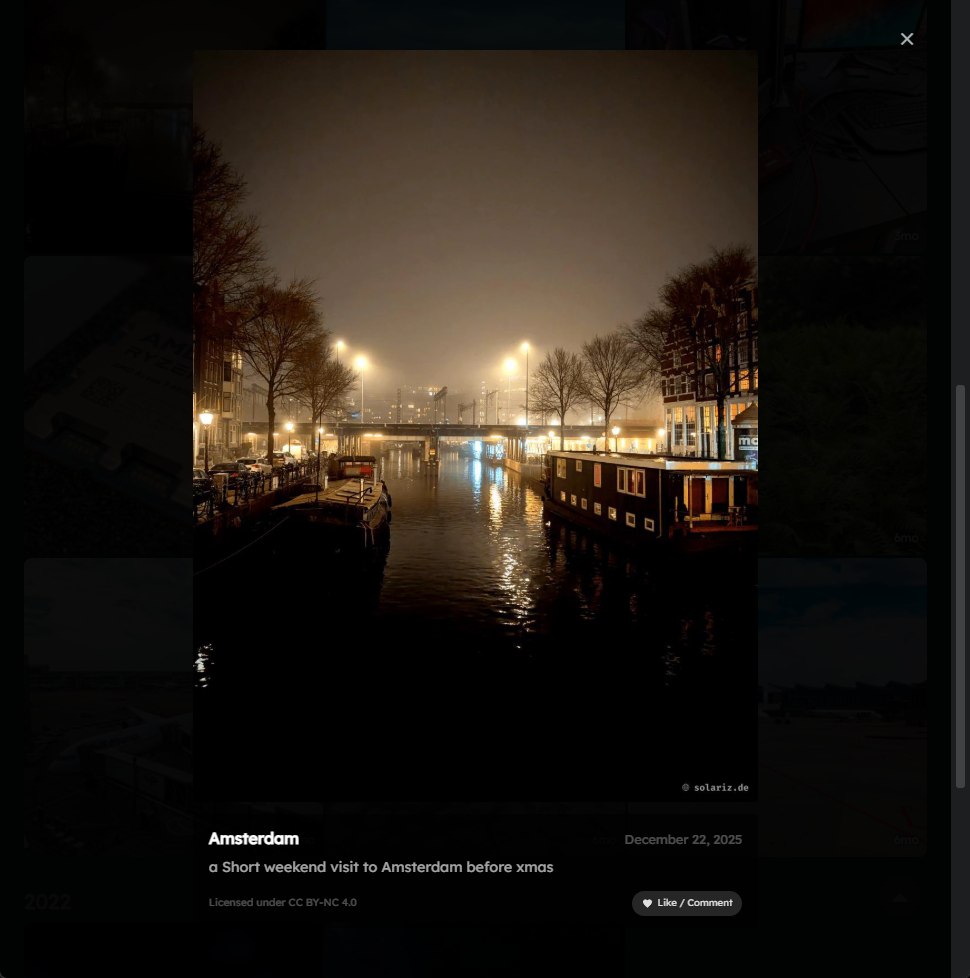
Have a look yourself in /photos
Building
Basically that is it. When I run the python script it will automatically pull only new content from my pixelfed account. I put everything in a nightly cron once every 24h in a script calling the python file and if a new post was downloaded it automatically runs my deployment; run hugo build and upload the new created static pages and images to my host at bunny.net cdn.
Let me know what you think.
Comments
With an account on the Fediverse or Mastodon, you can respond to this post. Since Mastodon is decentralized, you can use your existing account hosted by another Mastodon server or compatible platform if you don't have an account on this one. Known non-private replies are displayed below.