With today’s released Patch 4.5, Star Citizen switched to using the Vulkan renderer by default. This is a big step forward. But unfortunately, for some players, the game simply does not start anymore. You run the launcher, and then the game immediately crashes.
I ran into this myself, and eventually, after trying everything, I found I got it working.
Also a recommendation after you got Vulkan running I wrote about best Performance Settings for Star Citizen Vulkan in my citizen-history blog.
NVIDIA User on AMD CPU
I have an RTX 5080 on a Ryzen 9800X3D; when the game starts, it immediately crashes. In the LIVE Directory, you find a Game.log file showing clearly that the error is the initialization of the Vulkan Renderer:
Failed to create Vulkan logical device
GPUDeviceVulkan.cpp:825
vkCreateDevice: Failed to create device chain
STATUS_CRYENGINE_FATAL_ERROR (0x2BADF00D)
Game.log
<2025-12-18T16:56:32.471Z> VulkanMetric - Device (NVIDIA GeForce RTX 5080) [GPU (Discrete)] ID:11266
<2025-12-18T16:56:32.471Z> VulkanMetric -     Driver 591.59.0.0
<2025-12-18T16:56:32.471Z> VulkanMetric -     VulkanAPI 1.4.325
<2025-12-18T16:56:32.471Z> VulkanMetric -     Supports 6 Queue Families
<2025-12-18T16:56:32.471Z> VulkanMetric - Device (NVIDIA GeForce RTX 5080) valid GPU
<2025-12-18T16:56:32.471Z> VulkanMetric - Device (AMD Radeon(TM) Graphics) [GPU (Integrated)] ID:5056
<2025-12-18T16:56:32.471Z> VulkanMetric -     Driver 2.0.353
<2025-12-18T16:56:32.471Z> VulkanMetric -     VulkanAPI 1.4.315
<2025-12-18T16:56:32.471Z> VulkanMetric -     Supports 5 Queue Families
<2025-12-18T16:56:32.471Z> [VK] Chosen Vulkan GPU Device (NVIDIA GeForce RTX 5080) Driver Version (591.59.0.0) Vulkan API (1.4.325)
<2025-12-18T16:56:32.471Z> [VK] Current Device: (NVIDIA GeForce RTX 5080) VendorID: (4318)
<2025-12-18T16:56:32.471Z> [VK] Current Device: (NVIDIA GeForce RTX 5080) VendorID: (4318)
<2025-12-18T16:56:32.471Z> [VK_INFO] vkCreateDevice layer callstack setup to:
<2025-12-18T16:56:32.471Z> [VK_INFO]    <Application>
<2025-12-18T16:56:32.471Z> [VK_INFO]      ||
<2025-12-18T16:56:32.471Z> [VK_INFO]    <Loader>
<2025-12-18T16:56:32.471Z> [VK_INFO]      ||
<2025-12-18T16:56:32.471Z> [VK_INFO]    <Device>
<2025-12-18T16:56:32.471Z> [VK_INFO]        Using "NVIDIA GeForce RTX 5080" with driver: "C:\WINDOWS\System32\DriverStore\FileRepository\nv_dispi.inf_amd64_4646b47d9477048e\.\nvoglv64.dll"
<2025-12-18T16:56:32.506Z> GPU benchmark: 14.52 ms (Adapter index: 0)
<2025-12-18T16:56:32.622Z> [VK_ERROR] terminator_CreateDevice: Failed in ICD C:\WINDOWS\System32\DriverStore\FileRepository\nv_dispi.inf_amd64_4646b47d9477048e\.\nvoglv64.dll vkCreateDevice call
<2025-12-18T16:56:32.622Z> [VK_ERROR] vkCreateDevice:  Failed to create device chain.
As you see in the above Log I even tried to revert the NVIDIA Driver to an older Version 591.59 which did not helped.
The Ugly Crash:
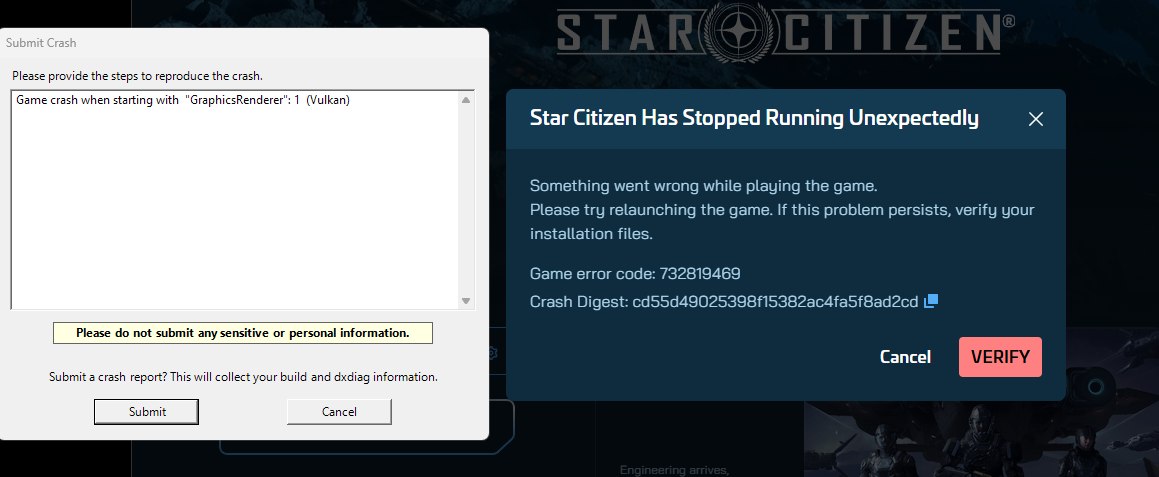
Now I run all the common things you do: driver uninstall, clean reinstall, game repair, config delete, default settings, Vulkan SDK, … nothing helped for me.
What really helped for me
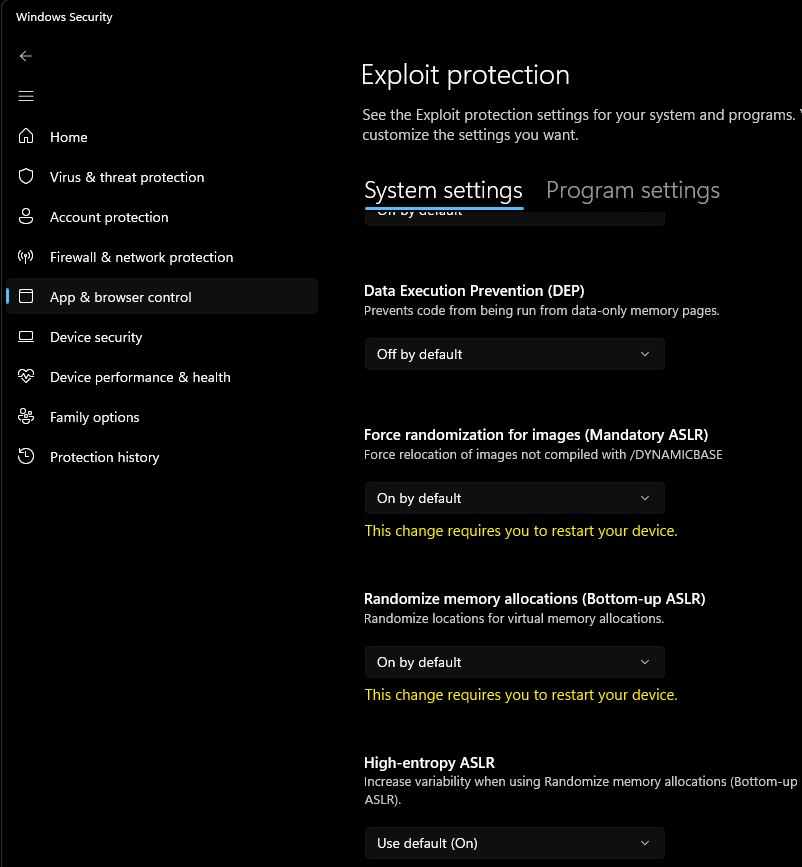
To skip the blabla, it was something absolutely not obvious to me. As said, everything I tried didn’t work, so you get desperate and you try all the stuff you hear. Ensure that ASLR IS TURNED ON:
For me it was a combination of Exploit Protection ASLR and Custom Application Profile.
- Open your Windows Settings and go to App & browser control
- at the bottom, open the Exploit protection settings
- First, ensure that force randomization for images (Mandatory ASLR) is set to “On by default”
- Also, the next Option Randomize memory allocations to “On by default”
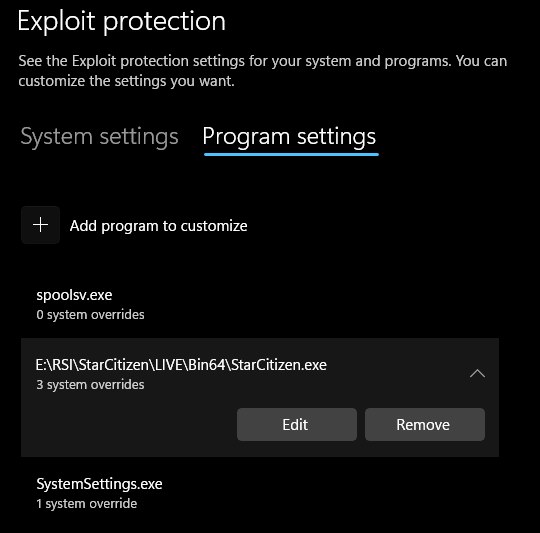
- This was the case for me already before, but above you find a Tab “Program settings” which has overrides for some programs.
- Open the Program Settings Tab and check carefully if Star Citizen is in there somewhere; if so… remove the entry.
Beside that before I did a DDU + NV Clean install of the NVIDIA Driver and finally it worked again on Vulkan.
Still Crashing ?
If this is not the solution to help you, I can run you down the regular steps to try making it work. On Spectrum some users suggest that those steps helped:
Clean Driver Install
A common good thing is to ensure to make a clean driver reinstall. This sounds easy, but it is not just installing the current driver again. Instead we need to ensure the current one and older Versions are all fully uninstalled:
- Open windows installed programms and uninstall everything you find named
Vulkan, like Vulkan SDK or VulkanRT - Also uninstall the
Aftermath SDKif installed - Download the DDU tool
- To use the DDU uninstaller, you need to restart Windows into Safemode
- In Safe-Mode run the DDU tool and Select “All GPUs” and the Option “remove everything and restart”
- After your windows is back; get the latest GPU Driver. For Nvidia I can recommend the NV Clean Installer
Good Luck.
Vulkan Runtime
On some AMD Cards it seem to helped some users to install the VulkanRT. Go get it here: VulkanRT-X64-1.4.335.0-Installer.exe
Also ensure in your AMD Adrenalin Settings you Turn off Frame Gen, Anti-Lag and Sharpening.
Disable Vulkan
If all did not help, you still have the option to force Star Citizen back to using DX11 instead of Vulkan. The simple method is to navigate to
%localappdata%\star citizen
Inside this folder, find the current version sub-folder, inside you should find a Folder GraphicsSettings with a file called GraphicsSettings.json open this with a text editor and change the row "GraphicsRenderer": 1 to "GraphicsRenderer": 0 save and try starting Star Citizen.
The alternative option is to create a user.cfg override. To do so, navigate into your SC install folder; inside you find a LIVE Folder. Create a text file user.cfg within that LIVE folder. (Be sure you see that the extension is not .txt the full file name needs to be user.cfg sometimes windows hide the real extension) insert this into the file:
# 0 = DX11, 1 = Vulkan
r.graphicsRenderer = 0
Save and try.
Good Luck - Issue Council
I hope one of those methods could bring your game back. As final words in this post, I want to point to two Issue Council (bug tracker) links that may have additional help and information. Anyhow, it can’t hurt if you report you having the same problem there.
And Finally there is Always the Spectrum Chat #helpdesk-volunteers remember be respectful, those people there are community members volunteering to help.
o7
Comments
With an account on the Fediverse or Mastodon, you can respond to this post. Since Mastodon is decentralized, you can use your existing account hosted by another Mastodon server or compatible platform if you don't have an account on this one. Known non-private replies are displayed below.